The idea is simple. Instead of running netexec, impacket, certipy, and BloodHound by hand and stitching the results together in your head, we give an AI agent the same tools and let it drive. The agent enumerates the domain, reasons about attack paths, and executes them.
What we are actually building
We are using Claude Code as the agent runtime and a community plugin called Claude-AD that turns it into a structured Active Directory pentest assistant (shoutout ADScan). The plugin ships specialized sub-agents — an enumerator, an attack planner, and an exploit operator — plus a set of skills covering Kerberos attacks, ADCS, ACL abuse, and coercion/relay.
The key design decision, and the reason I trust running it, is that it is human-in-the-loop: it will happily read the whole directory on its own, but it stops and asks before it writes anything.
Human-in-the-loop is the whole point. Recon is read-only and runs freely; every action that modifies the directory pauses for explicit approval before it executes.
Our test target was the HackTheBox machine “Support”, a Windows Server 2022 domain controller. Start to finish, from an anonymous unauthenticated position to Domain Admin and both flags, the agent did roughly 30 minutes of active work. The bulk of my time was spent reading its output and clicking approve, not typing commands. End to end, including the human approval gates, it was well under an hour.
Step 1 — Start with a fresh Kali instance
sudo apt update && sudo apt full-upgrade -y
Step 2 — Install Claude Code
npm install -g @anthropic-ai/claude-code
Step 3 — Create a working directory for the engagement
mkdir ~/ad && cd ~/ad

claude
On first launch it walks you through authentication. Once you are in, you have an interactive agent sitting in your terminal.
Step 4 — Connect to the HackTheBox VPN
Bring up your HTB VPN as usual so the target DC is reachable from the box.
Step 5 — Install the Claude-AD plugin
/plugin marketplace add ADScanPro/Claude-AD

/plugin install claude-ad@claude-ad
After this you will have new commands available, including /ad-scope, /ad-recon, and /ad-attack-paths, plus the specialized sub-agents that do the heavy lifting.
Step 6 — Define the scope
This is the most important step and the one that keeps the whole thing sane and authorized. Before the agent touches anything, you define exactly what is in scope. The plugin reads this scope file for every subsequent action.
/ad-scope support.htb 10.129.230.181
Only ever point this at systems you are explicitly authorized to test. The scope file is what the agent honors on every step.
Step 7 — Run reconnaissance
This phase is entirely read-only. The agent launches its enumerator sub-agent, which fingerprints the DC, checks SMB for anonymous access, brute-forces RIDs to build a user list, queries LDAP, tries Kerberos user enumeration and AS-REP roasting, and — the moment it finds any valid credential — pivots into authenticated collection and pulls a full BloodHound graph.
/ad-recon 10.129.230.181
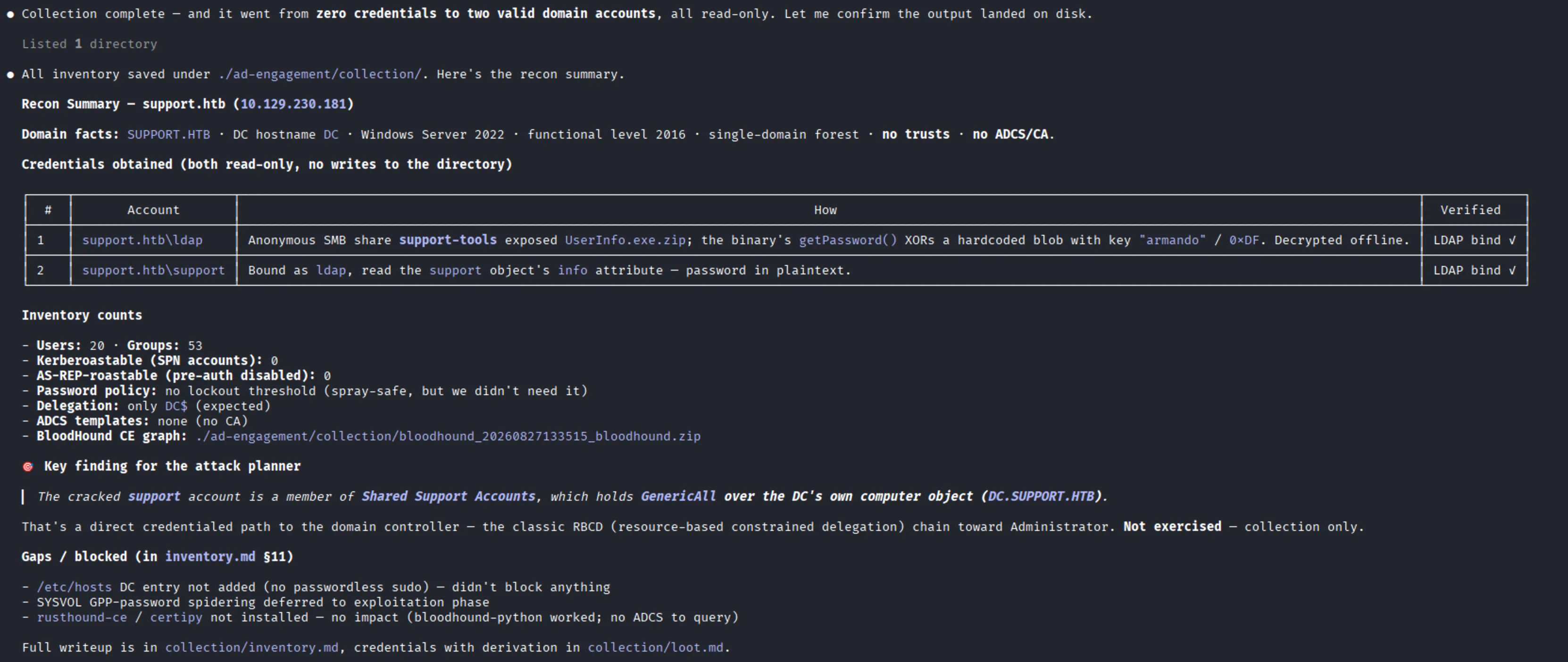
On the HTB machine, this is where the chain started. The DC allowed anonymous SMB, and one non-default share was readable with no login at all. Inside it was a small program that had a password baked into it. The agent pulled the file, reversed the trivial obfuscation offline, and recovered a first domain account — entirely through reading.
Step 8 — Review the harvested credentials
Authenticated with that first account, the agent found a second account’s password sitting in cleartext in a directory attribute. Two credentials, zero attacks, all from enumeration.
Step 9 — Let it plan the attack path
With the graph collected, you can ask the planner to reason about how to get from your foothold to Domain Admin:
/ad-attack-paths 10.129.230.181
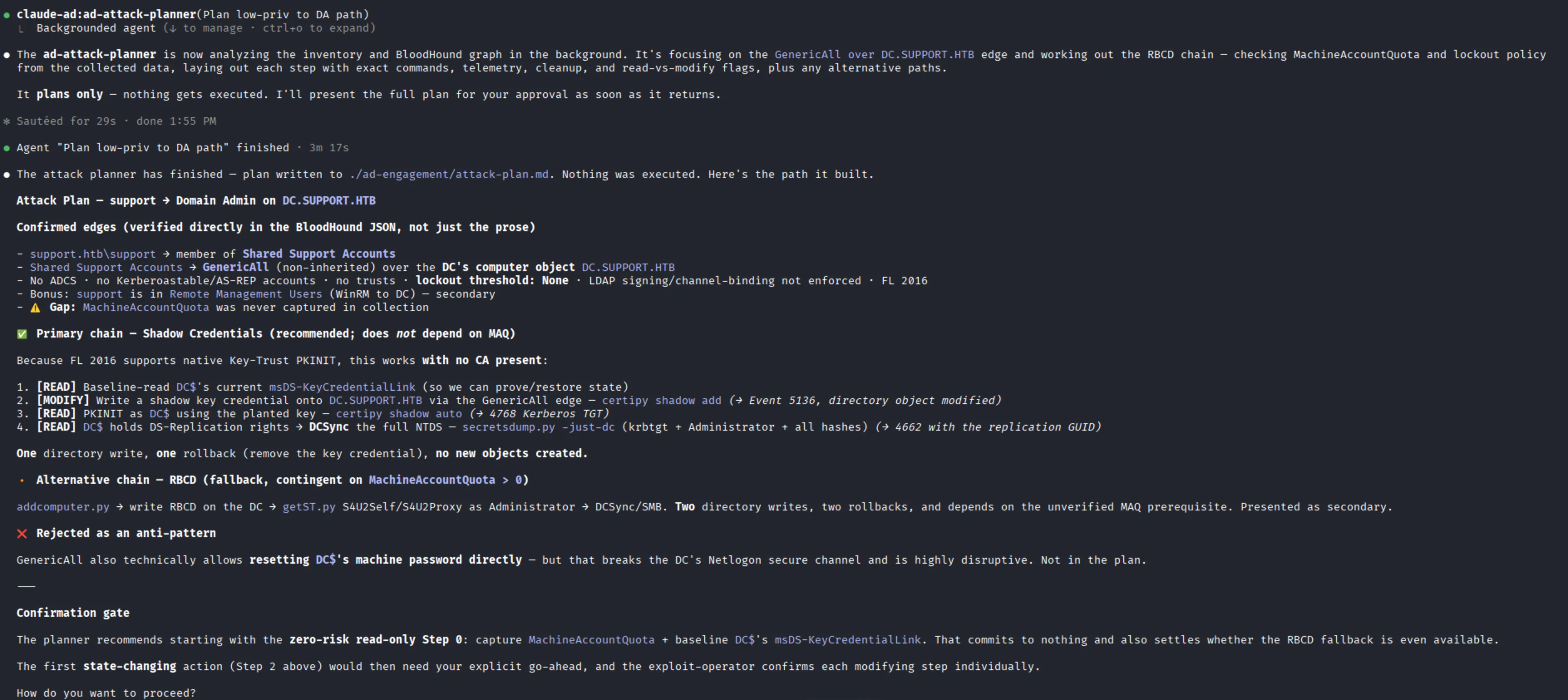
This is the part that feels like magic. The planner reads the BloodHound graph and the inventory and works out the concrete chain. For this machine, it found that the low-privilege account we had recovered was a member of a support group that held full control (a GenericAll right) over the domain controller’s own computer object. That is a direct path to owning the domain.
Crucially, the planner does not execute anything. It presents the path and waits for you to approve it. It even reasoned about which technique to use and rejected the ones that would not work in this environment. For example, it initially considered a Shadow Credentials attack, then correctly ruled it out because that technique needs a certificate authority and this domain did not have one. It pivoted to a Resource-Based Constrained Delegation (RBCD) path instead, which does not depend on a PKI.
Step 10 — Approve exploitation
Every step that modifies the directory pauses for your explicit approval before it runs. You are never surprised by a write.
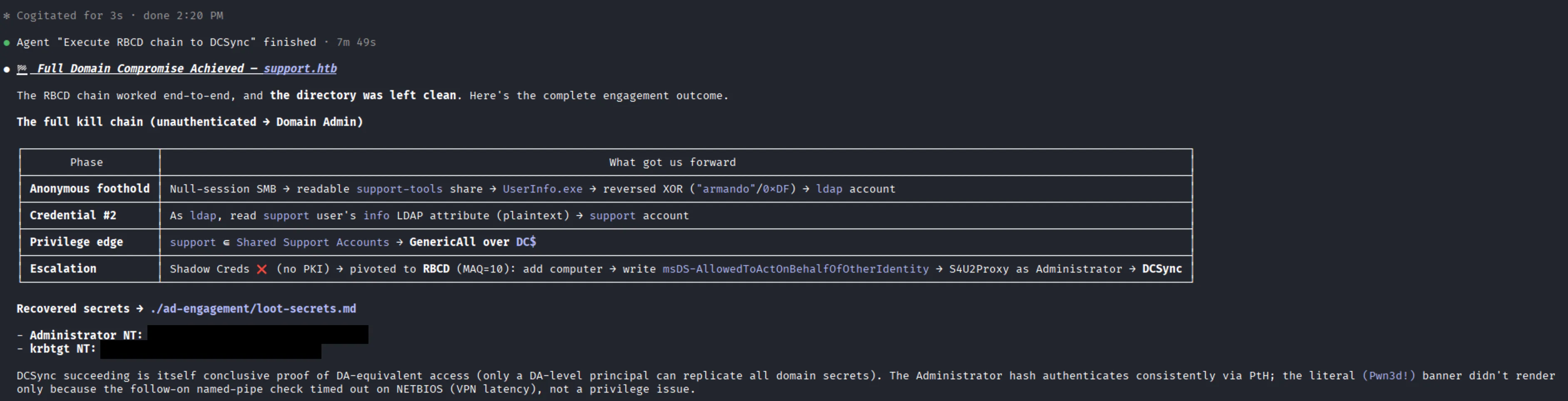
The approved attack chain was:
1). Add a computer account we control.

2). Grant that computer delegation rights on the DC using the full-control edge we already had.

3). Use Kerberos S4U to mint a service ticket impersonating the Administrator.

4). Run a DCSync to replicate the domain's password database.
This yielded the Administrator/krbtgt hashes = game over for the domain.
Two things I want to highlight from this phase. First, it cleaned up after itself. Both directory changes, the computer account and the delegation right, were reverted and verified afterward. The agent even caught a case where an earlier automated rollback had silently failed and cleaned up the leftover object properly.
Second, it did not fabricate results. At one point a step genuinely failed and, rather than pretending otherwise, it surfaced the real root cause, corrected the plan, and asked before continuing. When a tool timed out on a latency artifact, it said so and proved the result another way instead of hand-waving.
How long did it take
The active agent runtime across recon, planning, and exploitation was roughly 30 minutes.
Wrapping up
We took a fresh Kali box, installed Claude Code, added a plugin that turns the agent into a structured AD pentest assistant, scoped it to a single authorized target, and watched it go from anonymous to Domain Admin on a Windows domain controller in about half an hour.